Table of Contents
AI features entered Android phones gradually. What started as experimental tools in 2024 became standard features by 2025, and now in 2026 they are deeply tied into the operating system itself. AI now affects basic system tasks like battery optimisation and app scheduling while also powering features such as live translation and smarter photo editing and the new generation of “Agentic AI” tools that can do things for you across multiple apps automatically.
But these features, impressive on paper, have also raised a growing concern among Android users: are AI features slowing down Android phones?
To determine if AI is actually helping Android performance or simply consuming more system resources, we need a deeper AI hardware analysis of how modern Android phones manage RAM, NPUs, storage speeds, and thermal behavior
It really depends on the hardware inside the device. With premium flagship phones running high-end chips like the Snapdragon 8 Elite or Dimensity 9400 series, most of the AI processing is handled by dedicated hardware NPUs, with little impact on day-to-day performance. On older flagships and mid-range phones, things are less consistent though. The biggest complaints are usually heat and battery draining after AI-centric software updates and occasional lag when several AI services are running at the same time.
In everyday use these slowdowns tend to be less dramatic than subtle. While social media scrolling may still feel fast, you may notice small delays when switching between apps, creating AI summaries, using live transcription, or running camera features that rely heavily on local AI processing.
To answer the question properly, are AI features slowing down Android phones? We need to understand whether AI features are slowing down Android phones because of software design, hardware limitations, or both, we need to look beyond the marketing claims and examine how modern Android phones handle RAM usage, background processes, NPUs, storage speeds, and thermal management in practice.
Are AI Features Slowing Down Android Phones Because of On-Device AI?
To diagnose performance drops, it is crucial to understand where the most work is done. Mobile AI operations are split into two primary architectures:
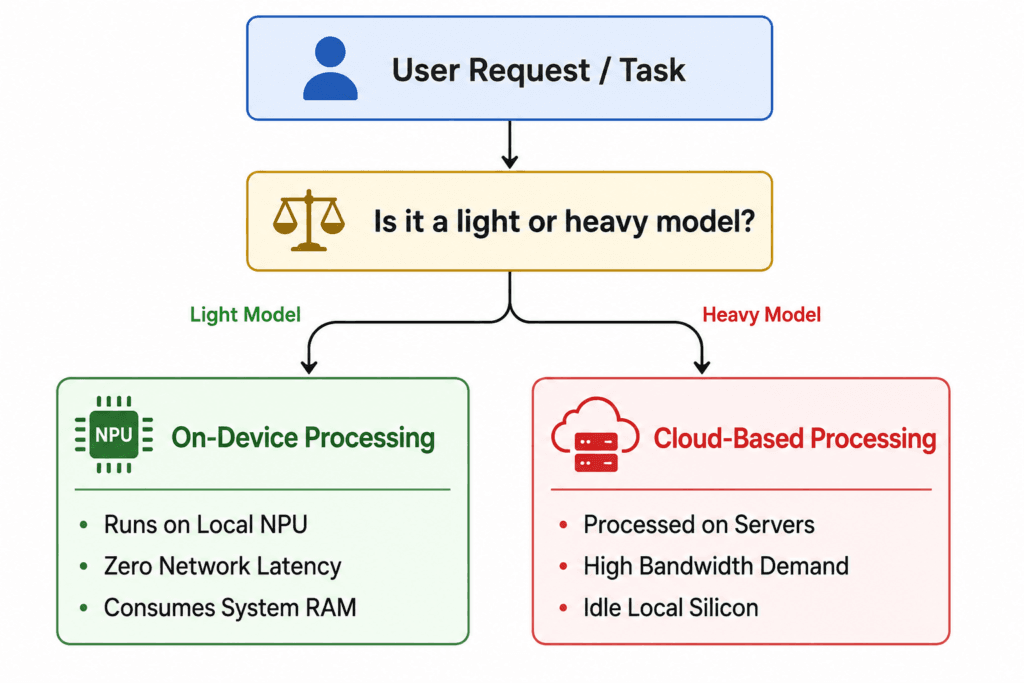
1. Cloud-Based AI
AI in smartphones almost always ran on servers. Most AI features used to depend on cloud servers. Your phone would upload the request, wait for processing remotely, and then download the results if you asked it to generate a complex image or summarise a long piece of text.
- Performance impact: Your phone didn’t slow down the local processor was mostly idle. This is one reason older cloud-based systems rarely triggered complaints that AI features are slowing down Android phones. However, it caused a delay due to the internet connection. If you had a dodgy 5G or Wi-Fi connection, the feature was slow and unresponsive.
2. On-Device AI
Things changed to locals running directly on the phone in 2026. The modern flagship chipsets have big dedicated Neural Processing Units (NPUs). These chips are now powerful enough to run AI chat models and image processing tools directly on the phone. Features like offline voice transcription, live translation, and instant text rewriting now rely heavily on local AI processing directly on the phone.
- Performance Impact: It removes network latency and guarantees privacy, but all of that processing puts much more pressure on the phone’s hardware, especially the system memory (RAM), the hardware design, and the cooling systems.
RAM Optimization Challenges on AI-Powered Android Phones
One of the biggest downsides of on-device AI is memory usage. AI features are starting to place far more stress on smartphone memory than most users realize. Much of the discussion around whether AI features are slowing down Android phones now centers around RAM usage. As AI features expand, RAM usage has become a major concern for smartphone makers. Some reviewers now describe this as a growing RAM problem.
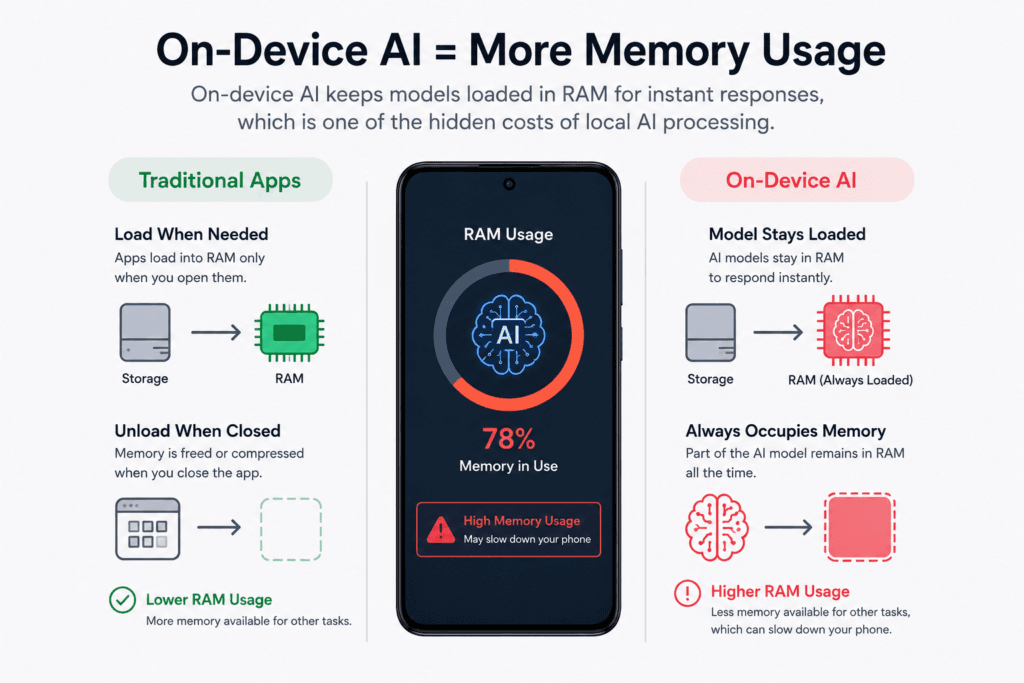
Traditionally, apps normally stay in storage until they run and load only necessary components into volatile memory (RAM) when executed. When you closed the app, the system could easily flush that memory or compress it.
On-device AI changes this behavior significantly. To respond instantly without using the cloud, part of the AI model often needs to stay loaded in memory continuously. This constant memory allocation is one of the hidden costs of local AI processing on smartphones.
As more Android features become AI-driven, this growing memory demand is becoming one of the biggest hardware challenges for modern smartphones.
The Memory Squeeze
If an AI model on the device may continue using a large amount of RAM in the background, a phone with 8 GB of total RAM suddenly has its available memory cut in half before the user ever opens a single web browser tab, game, or social media application.
Once RAM fills up, Android has to start swapping memory and begin moving temporary data into slower storage or aggressively kill off background apps. This is where efficient RAM optimization becomes critical for maintaining smooth multitasking performance.
The slowdown usually appears in subtle ways:
- Apps may reload more frequently after switching between them.
- Animations can occasionally feel less smooth, and even the keyboard may respond slightly slower when AI-powered prediction features are active.
- The keyboard exhibits input latency because the underlying predictive text engine is competing for memory blocks.
Because of this, mid-tier devices that shipped with 8 GB or even 12 GB of RAM are struggling to keep up with system-level AI updates, driving up memory demands and forcing premium flagships to push into 16 GB or 24 GB limits.
Thermal Throttling: The Cost of Sustained AI Computation
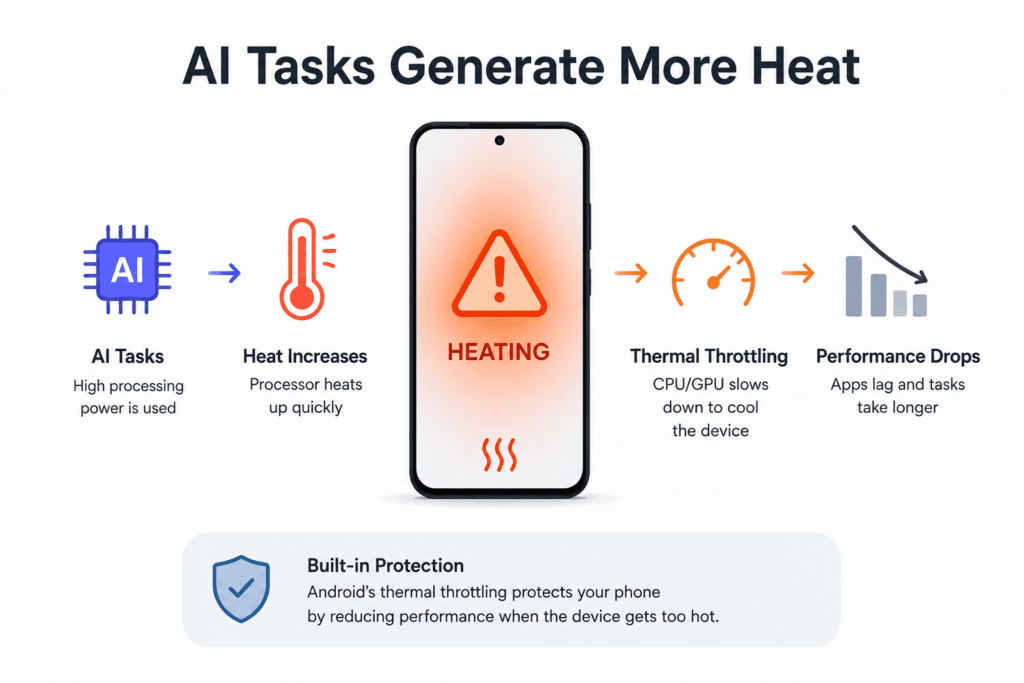
Heat is becoming another serious challenge for AI-heavy smartphones. Running AI tasks locally requires a huge amount of processing power. The phone’s chips have to work much harder during AI-heavy processing, creating quick spikes of heat within.
When you run longer AI tasks like AI video editing, live stabilization or document analysis, or letting an Agentic AI assistant scan through hundreds of pages of local documents, the processor heats up quickly. For many users, this is where it becomes an obvious question: are AI features slowing down Android phones during extended workloads? Thermal throttling is built into Android’s kernel, which purposefully slows down the CPU and GPU clocks to prevent overheating.
How AI Heat Affects Everyday Performance?
The strange part about AI-powered thermal throttling is that it might take less time for the AI feature to process, but the rest of the time phone may temporarily slow down. If you start gaming or switch to heavy apps immediately after running a heavy AI routine, the device feels sluggish, hot to the touch, and visibly choppy. Raw benchmark scores do not always reflect real-world performance when continuous AI processing pushes the chipset into a protective, low-performance state.
Software Bloat and Background Agency
By 2026, modern Android software now does much more in the background. Modern AI systems mean your phone is proactive. It reads your on-screen content and tracks your location patterns, predicts what you’re about to type and monitors incoming notifications to give you an overview before you even open the app.
This certainly makes life a whole lot more convenient on a day-to-day basis, but it also means your phone is constantly doing background work.
Features like AI notification summaries and predictive assistance are now becoming common across both Android and iOS ecosystems.
Constant Background Processing
Older Android phones spent much more time idle when not actively being used. Background processes are running all the time in 2026:
- Predictive AI Systems: Predicting the next app launch based on user activity.
- Background Content Analysis: Organizing photos, messages, and emails so they can be searched instantly using natural language
- On-Screen Observers: Waiting silently for a system trigger to capture and parse visual assets.
That constant background workload lifts baseline system load. On high-end chips, this overhead is minimised by specialised low-power-efficiency cores. But on older or cheaper processors, it reduces the resources available for smoother multitasking, causing minor UI slowdowns and random drops in frame rates. This constant activity is another major reason some users ask the question: are AI features slowing down Android phones over time?
The Divide: Flagships vs. Mid-Range and Older Phones
The question of whether AI features are slowing down Android phones cannot be answered with a blanket statement; it depends entirely on the tier of your device’s hardware. A proper AI hardware analysis shows that flagship devices handle AI workloads far more efficiently because they include dedicated NPUs, faster memory, and advanced cooling systems.
| Device Tier | Hardware Capabilities (2026) | Real-World Performance Impact |
|---|---|---|
| Premium Flagships (e.g., Latest Snapdragon 8-series / Tensor) | Built-in AI processors, 16GB, 24GB RAM, and advanced vapor chamber cooling. | Generally Smooth: Specialized hardware runs AI efficiently. AI power management actually accelerates app launching. |
| Mid-Range / Older Flagships (e.g., 2–3 years old or mid-tier silicon) | Software-emulated AI or weak NPUs, 8GB, 12GB RAM and basic thermal cooling. | Performance Can Vary: RAM bottlenecks cause background app closures; sustained tasks trigger severe thermal throttling. |
| Budget Devices | No dedicated NPU, 6GB RAM, Limited thermal management. | Struggles With Modern AI Features: If modern AI updates are forced onto these devices, they experience persistent system lag and poor battery life. |
The Flagship Exception
If you are using a high-end flagship phone in 2026, on premium devices, AI often helps the phone feel smoother rather than slower. Modern flagship phones use AI to manage resources more efficiently in the background. It learns your daily routines, allocates system resources to the apps you’re about to launch, dynamically balances refresh rates, and curbs inefficient, rogue background apps. These devices achieve such a tight silicon-software integration that intelligent optimisation neatly compensates for the performance tax.
The Problem for Mid-Range Devices
Mid-range and older phones face the biggest challenges with modern AI features. Phone makers want to stay competitive, and one way they do this is by backporting new AI features to older devices that don’t have the hardware capabilities to support them with software updates.
For example, according to MediaTek architecture, a phone without a dedicated NPU relies more heavily on the CPU and GPU when trying to run an image-remastering algorithm. This forces the processor to work much harder, drains the battery quickly and can make the phone temporarily unresponsive.
How to get your speed back on an Android phone packed with AI
If you notice that your device has become sluggish following recent AI-centric operating system updates, you do not necessarily need to buy a new phone. You can mitigate the performance drain by taking control of how AI uses your system resources:
Turn off On-Device AI and Use Cloud Processing Instead
Many modern Android phones allow certain AI tasks to be processed online instead of directly on the device. Head to your system settings under Advanced Features or AI Settings and look for an option to process data online. Running it in the cloud reduces local memory usage and helps multitasking feel smoother again.
2. Prune Background AI Agents
Turn off proactive features that you don’t actively use. If you don’t like predictive typing or automated notification summarisation, turning off these options stops the continuous background processing that uses additional processing power.
3. Manage Your RAM Aggressively
Limit your auto start permissions for unnecessary apps that are claiming to be using AI components. Also avoid overloaded Android themes and widgets that are always running real-time generative content or predictive shopping widgets in the background.
Conclusion: AI Is Changing Android, But Not Every Phone Is Ready
Are AI features slowing down Android phones in 2026? Yes, if you are not using hardware designed to handle them.
The smartphone industry is in a big shift in smartphone design. We’re going from phones that just run compiled code to phones that increasingly rely on AI processing. This has changed how smartphone performance is measured. Raw CPU speed is not so critical as NPU performance and available RAM capacity.
Premium devices are handling the transition much better, thanks to advanced silicon and generous memory allocations. But mid-range and legacy devices are paying a heavy price in extra system load, memory shortages and thermal constraints. Until efficient, better optimized AI software becomes the norm in development, the most practical way to keep your trusty Android device running fast, cool and responsive is to turn off unnecessary AI features.
Why do AI features use so much RAM?
Many on-device AI systems store portions of their models in memory to respond immediately without depending on the cloud. This ongoing use of memory can decrease the amount of free RAM available for use by apps and multitasking.
Do AI features really slow down Android phones?
They can, especially on older or mid-range devices. Modern AI tools are more RAM and processing power-hungry than the features of old smart phones. On flagship phones with dedicated AI hardware, it’s usually much smaller.
Why does my phone heat up while using AI features?
Many AI tasks that process intensivly such as live translation, AI photo editing, video enhancement, document analysis, etc. Longer workloads will generate additional heat and the processor will thermal throttle to protect the device.
What is thermal throttling on Android phones?
Android phones have a built-in safety feature called thermal throttling. If the phone is getting too hot, the system automatically reduces CPU and GPU performance to cool off the temperature and avoid hardware damage.
Are older Android phones struggling more with modern AI?
Yes, on the whole. Many older devices were not built for continuous on-device AI processing. Without dedicated AI hardware, and without sophisticated cooling systems, they can lag, overheat and drain the battery after major AI-focused software updates.