Table of Contents
Introduction
Many iPhones start slowing down over time the phone that used to feel smooth starts lagging, apps take longer to open, and the keyboard starts lagging. Many users eventually start wondering why iPhones slow down over time, even well-maintained iPhones can start feeling slower after years of use.
Misconception
There is a misconception; many people believe that Apple intentionally slows down the older phones to encourage upgrades. In reality, the explanation is more complicated. There are engineering reasons why iPhones slow down that are predictable. Battery degradation over time, storage fills up iOS upgrades demand more and more apps run in the background heat management systems slow things down.
Why Do iPhones Slow Down Over Time?
Modern smartphones are extremely powerful despite their small size, but they still have physical hardware limitations. A noticeable slowdown rarely comes from one specific cause. It is more often the several smaller issues building up over time.
Understanding why iPhones slow down over time, with its system-wide lag, stuttering animations, and slow touch responses, is the result of the confluence of a degraded battery, full storage, unoptimised background processes, and modern versions of iOS.
Storage space is one of the most overlooked causes of slowdown. Even a healthy iPhone can start feeling sluggish when it is nearly full, since iOS relies heavily on free space for caching, updates, and temporary system processes. According to Apple community support, limited storage space can affect certain background system processes and overall performance.
1. Battery Health and Apple’s Power Management
Battery health plays a major role in long-term iPhone performance. One of the biggest causes of iPhone battery health slowdown is natural battery degradation after hundreds of charging cycles.
What Happens as the Battery Ages
After hundreds of cycles, the battery gradually loses efficiency to provide consistent power delivery during times of heavy processing. If the voltage dips too low while doing heavy workloads (gaming or video rendering, for instance) the iPhone will shut off unexpectedly to protect its internal hardware. This is one of the main reasons why iPhones slow down over time as they get older.
To prevent this, the iOS operating system reduces processor performance temporarily. Common symptoms of this throttling include slow app startup times, lower gaming frame rates, longer scrolling stutters, and dimmer screen backlighting.
Apple’s 2017 “Batterygate” Controversy
Apple’s 2017 “Batterygate” began after users discovered that the company had secretly throttled the processor performance of older iPhones like the iPhone 6, 7, and SE through iOS updates. Apple faced criticism because users were not informed properly. This controversial system became one of the most widely discussed examples of iPhone battery health slowdown affecting older iPhones. Apple later confirmed that iOS dynamically manages performance on devices with degraded batteries to reduce the risk of unexpected shutdowns during peak workloads.
To check your battery health, go to Settings → Battery → Battery Health & Charging.
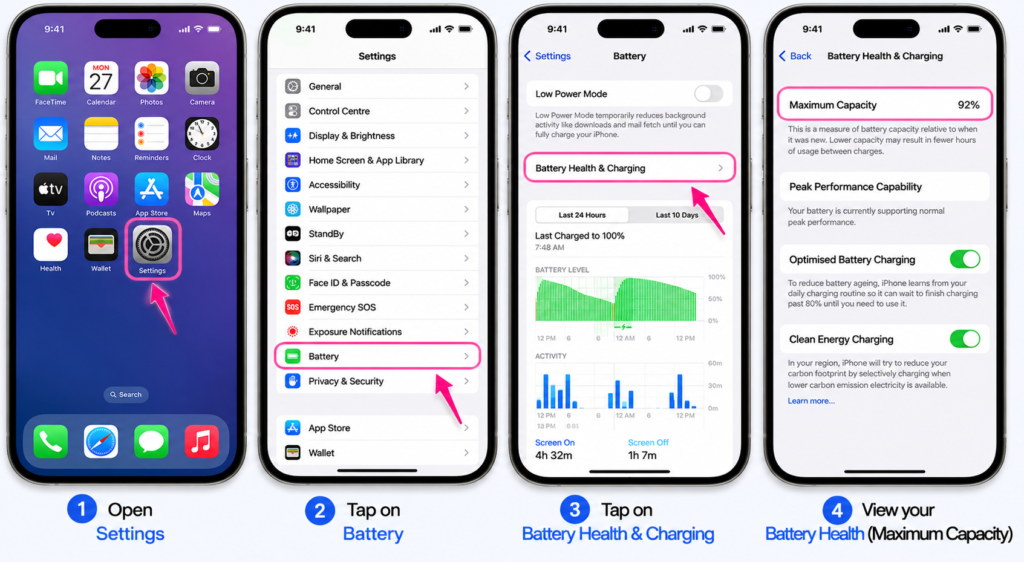
If your device reports that its maximum capacity has dropped below 80%, performance management has likely activated, causing a noticeable drop in daily operational speed.
2. Storage Capacity Slipped Below the Buffer Zone
Limited storage is one of the major reasons why iPhones slow down over time.In daily use iPhones need a reasonable amount of free storage. This space is used for background system tasks, temporary application caches, over-the-air system updates and image processing.
If your storage is over 95% full, your operating system struggles to handle background system tasks smoothly. This leads to reduced responsiveness and requires the system to spend additional processing power searching for available blocks of storage space.
In real-world experience, storage-related slowdowns are far more common than most people realize. Many users blame the battery immediately, but iPhones that are nearly full often become noticeably less responsive even when battery health is still excellent.
Signs Your Storage Is Too Full
- Persistent keyboard input lag
- Prolonged camera shutter delays
- Web browsers freezing mid-scroll
- Frequent application crashes
Modern apps have grown substantially, gradually consuming more storage.
To maintain optimal processing speeds, keep a minimum of 15% to 20% of your total storage capacity completely empty. To manage your storage: Navigate to Settings → General → iPhone Storage.
Apple community support says iOS also requires temporary free storage for significant system updates and background maintenance tasks
3. The Demands of Modern iOS Updates
Each year, Apple introduces a new version of iOS with additional features and security improvements. Many users notice their iPhone lagging after iOS update because it is primarily designed for the newer iPhone hardware architecture of the latest iPhone models. When installed on an older generation iPhone, the older processor has to work a lot harder. Newer iOS versions require more system resources. Modern iOS versions make heavy use of on-device AI and machine learning, real-time voice & text recognition, and context-based image processing. Background AI processing with older processors is another major reason why iPhones slow down over time.
Older system chips don’t have newer neural processing hardware. This means older processors have to use their normal CPU and GPU power to run these heavy background features, leaving less of the system’s resources for everyday tasks.
Personally, newer visual effects and background AI features seem to have changed iPhone performance expectations a lot. Older iPhones can still handle basic tasks well, but modern iOS increasingly assumes the presence of faster AI hardware, more RAM, and stronger thermal efficiency found in recent models.
4. Background Apps Consuming RAM
Just because an application is not actively shown on your screen does not mean it has fully stopped running. There are lots of apps that run continuous background activity to fetch new data from remote servers, track location data, synchronise notification logs, and update widgets.
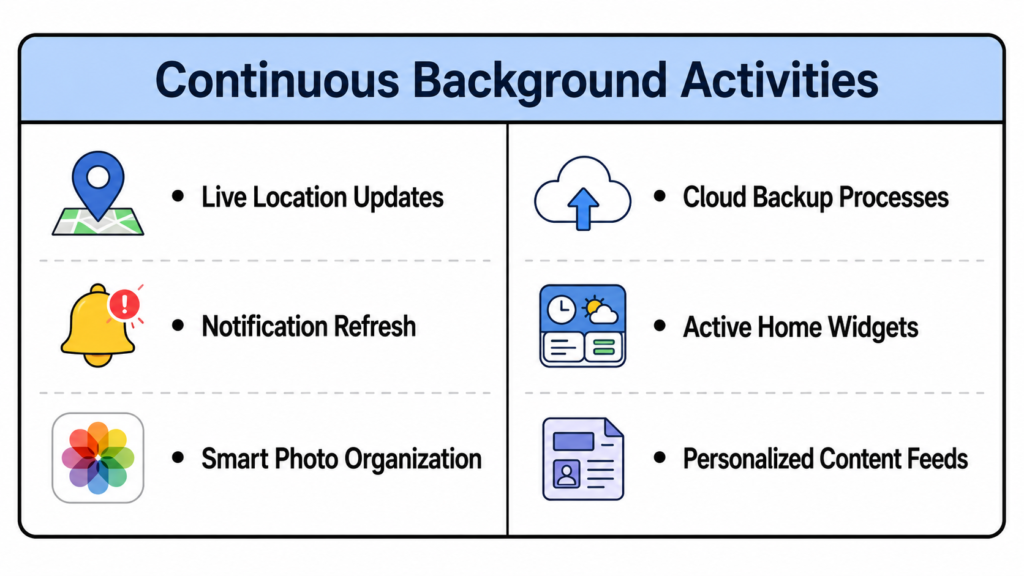
When dozens of apps are running these operations simultaneously, they create a constant background workload on your RAM and processor. When everything is running in the background and you have run out of RAM, iOS starts closing apps more aggressively and restarts again. It causes less smooth overall performance. You can read detailed post. How Much RAM Does a Smartphone Need in 2026? to understand the RAM requirements
To optimize background activity: Go to Settings → General → Background App Refresh and turn off access for non-essential applications.
Additionally, restricting location tracking permissions exclusively to “While Using the App” can instantly free up processor overhead.
5. Heat and Thermal Throttling
Excessive heat is one of the biggest causes of electronic performance. If the iPhone detects through internal temperature sensors that the operating temperature has become too high, it starts limiting performance to reduce heat.
The system deliberately reduces the processor speed to reduce heat and to protect the internal hardware. This thermal throttling is another major reason why iPhones slow down over time. Thermal throttling will cause your iPhone to feel noticeably slower, with less smooth animations and a dimmer screen brightness, regardless of the condition of the battery or how much storage space you have.
Personally, brightness dimming is often the easiest sign to notice first. Many users think their display is malfunctioning, but in reality the iPhone is simply reducing heat output to protect itself.
Common Causes of iPhone Overheating
Problems related to iPhone overheating and slow performance usually happen due to the following factors:
- Long gaming sessions on cell phones
- Fast charging during demanding tasks
- Using the device in direct sunlight
- Recording extended 4K video clips
If you want to prevent your iPhone from entering an overheating slowdown:
- Don’t run demanding apps while your phone is plugged in
- Remove thick cases that trap heat
- Don’t leave your phone in hot places such as your car dashboard.
Apple’s operating temperature recommendations, Apple recommends using iPhones in ambient temperatures between 0° and 35°C (32° to 95°F) for optimal performance.
How to Make an Older iPhone Faster Again
If you are searching for how to make an old iPhone faster, the most effective solutions are
Restart Your Device on a Fixed Schedule
If you leave your smartphone on all the time for weeks, it will build up temporary files, minor software glitches and background apps using more memory over time. A simple system restart will completely clear temporary memory usage, force any background processes that are not working correctly to stop and allow iOS to clear out temporary system data. You do not need to restart daily, but occasional restarts can help.
Clean Up iPhone Storage Properly
Go into your storage settings and remove files you no longer need. Get rid of old screen recordings, unwanted screenshots, duplicate photos, and large video files (archive to cloud storage or a computer). Next, clear apps with big cache files. This clears out extra storage used by the app and keeps your login credentials and documents.
A New Battery Can Restore Performance
If your battery health metrics have dropped below the critical level of 80%, for many users searching for how to make an old iPhone faster, a new battery restores smoother scrolling, faster app loading, and better responsiveness.
| Battery Health Level | Performance Status | Recommended Action |
|---|---|---|
| 85% – 100% | Optimal Speed | No action required; system runs at peak performance. |
| 81% – 84% | Normal Wear | Performance management may activate during heavy tasks. |
| 80% or Lower | Performance Throttled | Replace battery to restore smoother everyday performance |
Replacing the battery through Apple or an authorized repair provider is usually far less expensive than buying a completely new iPhone. Once a fresh battery is installed, iOS often no longer needs to reduce performance as aggressively to protect against unexpected shutdowns. As a result, many older iPhones feel noticeably smoother and more responsive again during everyday use.
Honestly, battery replacement is one of the most underrated upgrades for older iPhones. Many people assume the phone itself has become outdated, when in reality the battery is often the biggest source of the slowdown.
Update Your Apps Regularly
Old apps can lead to major performance issues. Many apps receive performance and compatibility improvements over time to ensure that they run smoothly on the latest version of iOS. To check for updates go to the App Store, tap on the icon for your user profile, and pull down to refresh the page to make sure that all your software is updated to its latest optimized version.
Enable ‘Reduce Motion’ and ‘Reduce Transparency’
Modern iOS uses more animations and blur effects to add depth. The effects look visually polished, but they require more graphical processing. These settings reduce visual processing demands. You can instantly reclaim this graphical processing power within accessibility settings:
- Open Settings → Accessibility → Motion
- Turn on Reduce Motion
- Go to Accessibility → Display & Text Size
- Enable Reduce Transparency
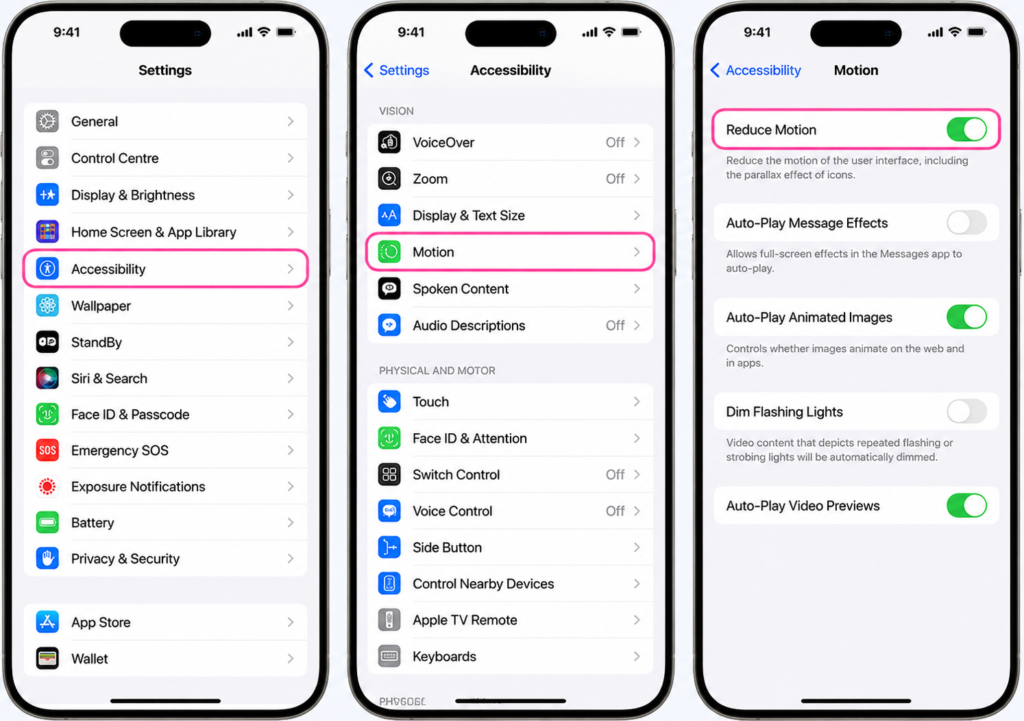
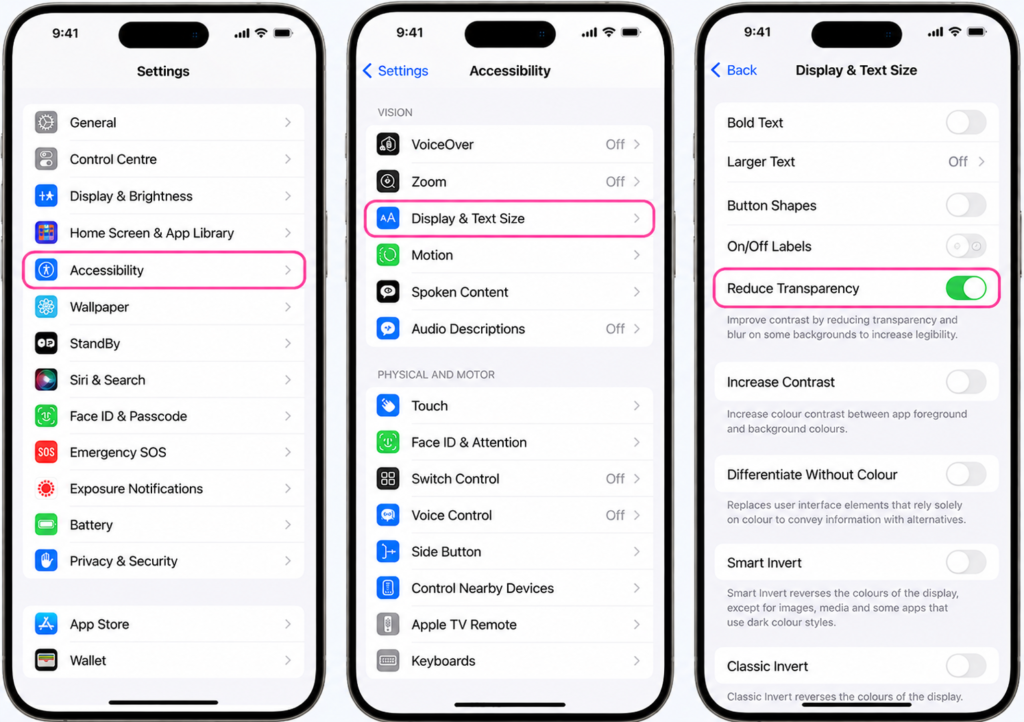
This removes the resource-intensive interface effects and replaces app transitions with a simple, fast fade animation that can make older iPhones feel more responsive.
In my personal experience, Reduce Transparency often has a bigger effect than people expect because blur effects are used constantly throughout iOS in Control Center, widgets, notifications, and app backgrounds. Older GPUs can struggle more with those effects over time.
Clear Safari Cache and Browsing Data
Safari stores temporary website data locally to improve loading speed, but excessive cached data can gradually affect browser responsiveness over time. Over months of browsing, Safari builds up cached website data, browsing history, and temporary website images that slow Safari down.
Go to Settings → Safari → select Clear History and Website Data.
Avoid Low-Quality Chargers
Most charging problems people encounter usually come from low-quality cables rather than the phone itself. Cheap cables often become unstable over time, causing intermittent charging, excess heat, or slower charging speeds.
Heat is usually the biggest warning sign. If a charger consistently makes the phone unusually hot during normal charging, it is generally a good idea to stop using it.
When Should You Replace Your iPhone?
A slower iPhone does not always mean you need a new phone. For most users, a simple combination of an inexpensive battery swap and a full storage cleanup will get you back to smooth everyday performance.
But hardware limitations eventually become unavoidable. When it makes sense to upgrade to a new iPhone model:
- Your phone can no longer get the latest major iOS updates, leaving you vulnerable to security issues.
- Frequent app crashes due to limited RAM.
- The battery drains completely in just a couple of hours even after being replaced.
- Physical hardware issues (like a cracked screen or damaged port) cost more to fix than the phone is worth.
For me, the biggest turning point is usually software support, not raw speed. Eventually an iPhone begins to feel more restrictive over time as it stops getting major iOS updates and security patches, especially as apps get heavier and newer features stop coming.
Older iPhones remain usable for so long because of Apple’s unusually long software support cycle. Apple provides 5 to 7 years of iOS updates as compared to many other smartphones.
Final Thoughts
Understanding why iPhones slow down over time is important before you asume that the device is outdated. The gradual slowing of an iPhone over time is a normal part of long-term use that results from normal aging batteries, limited storage space, and newer software demands. When a phone starts to lag after a few years of reliable service, it’s just a sign that the hardware needs a little maintenance.
Clear unnecessary files, install a new battery if health drops below 80%, manage background app activity, and prevent the device from overheating and you can noticeably improve performance and delay the cost of upgrading.
By managing storage carefully, replacing a degraded battery, reducing unnecessary background activity, and preventing iPhone overheating and slow performance, many older iPhones can continue running smoothly for years.
Why do iPhones slow down over time?
There are several reasons why iPhones slow down over time, including battery degradation, low storage space, overheating, background app activity, and newer iOS updates that require more processing power.
Does Apple intentionally slow down older iPhones?
Apple does not intentionally slow down older iPhones to force people to buy new ones. But iOS also has power management features that will deliberately throttle CPU speed on devices with degraded batteries to prevent unexpected shutdowns.
Can replacing the battery make an old iPhone faster?
Yes. Battery replacement is often the most effective solution for iPhone battery health slowdown. Many older iPhones become noticeably smoother and more responsive after installing a new battery.
Why does my iPhone lag when storage is full?
Many users notice their iPhones lagging after iOS update. Limited storage space is one of the biggest reasons why iPhones slow down over time because iPhones need free space to cache, update, store temporary files, and run background system processes. When your iOS device is running out of storage iOS doesn’t manage resources efficiently. This can lead to app lag and performance problems.
How much free storage should an iPhone have?
For smooth performance, it is recommended to keep at least 15% to 20% of your iPhone storage free. This helps iOS handle updates, caching, and background processes properly.
Do iOS updates slow down older iPhones?
With every new iOS update comes new features, better AI processing and security, all of which require more hardware resources. Older iPhones will receive the latest iOS updates, but they have older processors and RAM that might not run as fast.
Can low-quality chargers damage iPhone performance?
Cheap or uncertified chargers can generate excess heat and unstable charging behavior. Over time, this may contribute to battery degradation and thermal stress that affects overall performance.
Is it worth repairing an old iPhone in 2026?
It depends on software support, repairing cost, and daily usage. If the iPhone still receives iOS security updates and only needs a battery replacement, repairing it is often far cheaper than upgrading.
Does battery health affect iPhone speed?
Yes. One of the biggest causes of iPhone battery health slowdown is aging batteries that can no longer deliver stable power during demanding tasks. iOS may reduce processor performance to prevent unexpected shutdowns.
How can I make an old iPhone faster again?
If you are looking for how to make an old iPhone faster, start by replacing an older and degraded battery, clearing storage space, disabling unnecessary background apps, and reducing overheating
Why does my iPhone become slow when storage is full?
Problems related to iPhone overheating and slow performance happen when the processor generates too much heat during gaming, charging, video recording, or heavy multitasking. iOS reduces performance temporarily to protect internal hardware.